You land on Raphael AI and the badges say it all: 100% Free, No Login Required, Unlimited Generations, Powered by GPT Image 2.5. You type a prompt, press Generate, and your image comes back with a watermark. Then you notice the settings bar under the prompt box: Seedream 3.5, 0.5K, Low.
That gap between the badges and the settings bar is what this review is about. We went through Raphael's generator, pricing page, model pages, photo editor, video tool, terms of service and privacy policy on October 21, 2026, and every screenshot below was captured that day. The date matters. Raphael changes fast, and many of the reviews that rank for this question still describe the tool as it was in 2025.
One disclosure before we start: this site runs a multi-model image and video platform that competes with Raphael. We say where it fits better and where Raphael wins, and every claim about Raphael comes from Raphael's own pages, checked that day.
Raphael AI Review: The Quick Verdict
| Question |
Answer (October 21, 2026) |
| What is it? |
A browser-based AI image and video platform with 14 image models and 13 video models behind one prompt box |
| Is it free? |
Yes, in a basic mode: Seedream 3.5 at 0.5K, Low quality, no account needed, 0 credits |
| Is it unlimited? |
The basic mode is. Premium models cost credits, and the "unlimited" perks on paid plans cover only Seedream 3.5, Seedream 3.5 Pro and MiniMax H3 |
| Watermark |
On every free image; removed on paid plans |
| Commercial use |
Paid subscribers only, according to the terms |
| Price |
Pro is $20 a month, or $10 a month billed yearly ($120), with 2,000 credits a month |
| Photo editing |
Needs an account; the default edit costs 2 credits |
| Video |
Free MiniMax H3 Turbo clips at 480p and 4 seconds, no sign-up |
| API |
No public API |
| Trustpilot |
2.8 out of 5 from 6 reviews (unclaimed profile) |
| Best for |
Free drafts, prompt experiments, hobby and family projects |
| Skip it if |
You need clean, full-resolution images without a subscription |
Our take: Raphael is a real, working product with a genuinely free tier and competitively priced paid plans. But "100% free, unlimited" describes a watermarked 0.5K draft mode. Anything you would publish, sell or print needs credits or a subscription.
What Is Raphael AI in 2026?
Raphael AI started in April 2025 as a side project posted on Indie Hackers: a no-login image generator running a custom Flux.1-dev pipeline on spare GPUs. The launch post promised no limits, no watermarks and images that auto-deleted within 10 minutes. The founder also admitted they hadn't worked out how to make money yet.
Eighteen months later, Raphael has answered that question. It is now a credit-based platform built on third-party models, and its terms describe it as an independent product and interface layer, not an official product of the model makers whose names it lists.
|
April 2025 launch |
October 2026 |
| Models |
One: Flux.1-dev |
14 image models (Nano Banana 2.1, GPT Image 2.5, Seedream 5.0, Grok Imagine 2.0 and more) and 13 video models |
| Free tier |
"No limits, no watermarks" |
Unlimited basic mode on Seedream 3.5 at 0.5K, with a watermark |
| Paid plans |
None |
Pro, Ultimate and Max, plus credit packs |
| Image storage |
Auto-deleted within 10 minutes |
Guest results kept only if you sign in within 10 minutes; history for accounts |
| Video |
None |
Seedance 2.5, Veo 3.1, Kling 3.0, Wan 3.0 and MiniMax H3 |
| Editing tools |
None |
Photo editor, background remover, expander, upscaler, watermark remover, clothes and hairstyle changer, headshots |
That table explains why so many Raphael reviews read oddly. The ones that call it "a free Flux generator with no watermark" are describing the 2025 version.
Smart routing, and why you should pick the model yourself
Raphael's homepage says its scene-aware routing picks the best available model for each prompt. Routing is convenient, but it costs you repeatability. If two runs of the same prompt land on different models, you get two different styles, two different ways of handling text in the image and two different takes on skin and lighting. You also can't reproduce last week's result, because you don't know which model made it.
Raphael does let you choose a model from the dropdown, and for any project where images have to match (a product set, a character series, a brand campaign) you should. Pick one model, note it down, and keep it.
Which "Raphael" is the real one?
The official site is Raphael AI at raphael.app. Search results also surface lookalikes:
raphaelai.org is a separate website that uses the Raphael AI name, with a different design and its own sign-in. It advertises Nano Banana 2 and "100% free" generation, but it doesn't run on Raphael's domain.raphael.ai is a different domain. Some of the "is it safe" scanner reports you'll find are about that domain, not the app.- Raphael's own FAQ says the service is web-only for now, with mobile apps planned. An app called "Raphael" in an app store is not the official product.
Is Raphael AI Really Free and Unlimited?
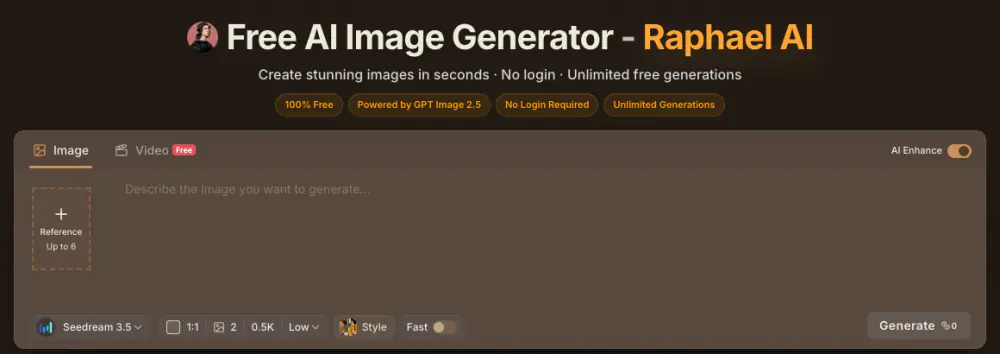
Raphael's homepage generator on October 21, 2026. The badges promise GPT Image 2.5 and unlimited generations; the default settings are Seedream 3.5, two images, 0.5K, Low quality, 0 credits.
Yes, with a narrow definition of "free." Raphael has four levels of access, and the word means something different on each one:
| Level |
Account |
What you get |
Cost |
Watermark |
| Guest |
None |
Basic mode: Seedream 3.5, 0.5K, Low quality, 1 to 4 images per run |
0 credits |
Yes |
| Signed-in basic |
Free account |
The same basic mode, unlimited runs in a shared queue (Fast Mode off) |
0 credits |
Yes |
| Free daily credits |
Free account |
Skip the queue or try higher-resolution models, up to 2K according to Raphael |
Daily allowance |
Yes |
| Paid |
Subscription |
Any model, up to 4K on Nano Banana 2, 2.1 and Pro, plus a priority queue |
Credits per image |
No |
Three details decide whether the free tier works for you.
Resolution. 0.5K means about 512 pixels on the short side. A 2K image has 16 times as many pixels as a 0.5K one, and a 4K image has 64 times as many. Generation cost rises with pixel count, which is why free modes keep resolution low. In practice, 512 pixels is fine for a phone screen or a quick concept and too small for print: at 300 dpi, it covers less than two inches.
Speed. The homepage says the free Basic model returns images in about eight seconds. The generator itself showed an estimate of about 60 seconds for the default 0.5K run when we checked. Paid plans move you to the front of the queue.
Storage. If you aren't signed in, results aren't saved to your history unless you sign in within 10 minutes. Refresh the page before then and they're gone.
Commercial use is the fourth catch. Raphael's terms let paid subscribers use generated content for commercial purposes, while free users are limited to personal and other non-commercial use. One answer in the homepage FAQ says anyone can use their images commercially; another says commercial use is for paid plans. The terms are the binding document, so plan on paid-only.
So when a Trustpilot reviewer calls the "free and unlimited" claim false advertising because they had to buy credits, both sides have a point. The basic mode really is unlimited. It just isn't the mode the badges describe.
Raphael AI Pricing: What $10, $20 and $40 a Month Buy
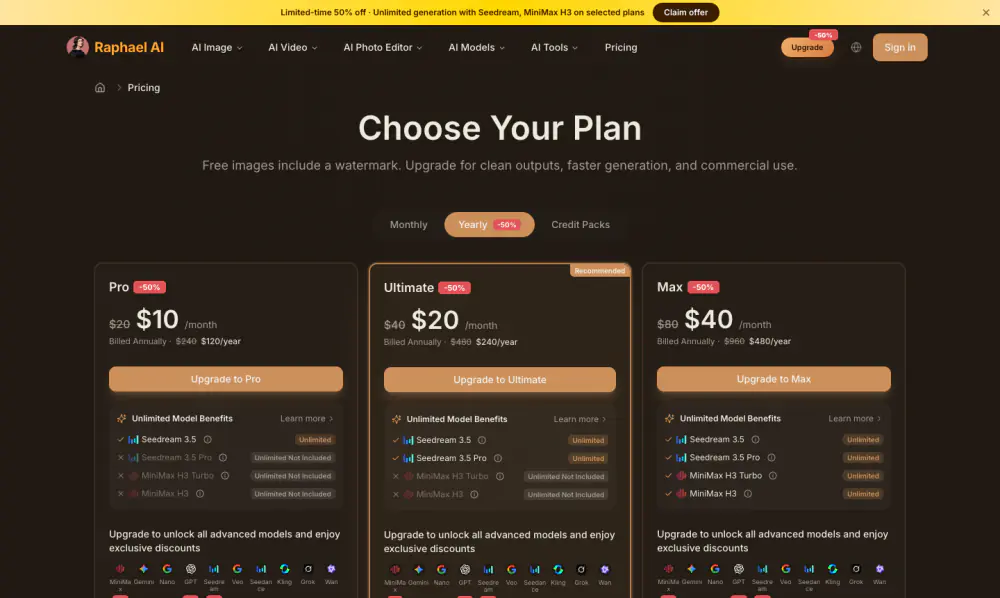
Raphael's yearly plans with a limited-time 50% discount. Each card lists which models are unlimited on that tier.
| Plan |
Billed monthly |
Billed yearly |
Credits per month |
Unlimited models |
| Pro |
$20/month |
$10/month ($120/year) |
2,000 |
Seedream 3.5 |
| Ultimate |
$40/month |
$20/month ($240/year) |
5,000 |
Seedream 3.5, Seedream 3.5 Pro |
| Max |
$80/month |
$40/month ($480/year) |
10,000 |
Seedream 3.5, Seedream 3.5 Pro, MiniMax H3 Turbo, MiniMax H3 |
All three plans remove the watermark and add a priority queue, batch processing in the AI tools and full privacy. If you'd rather not subscribe, Raphael sells credit packs: 1,500 credits for $29.9, 3,000 for $49.9, 5,000 for $69.9 and 8,000 for $99.9, each valid for six months. Subscribers get 50% extra credits on packs.
What 2,000 credits actually buy
The Pro card says "up to 2,000 fast images." That is a ceiling on the cheapest option, not what you get from premium models. Raphael publishes per-model credit costs on its Nano Banana pages:
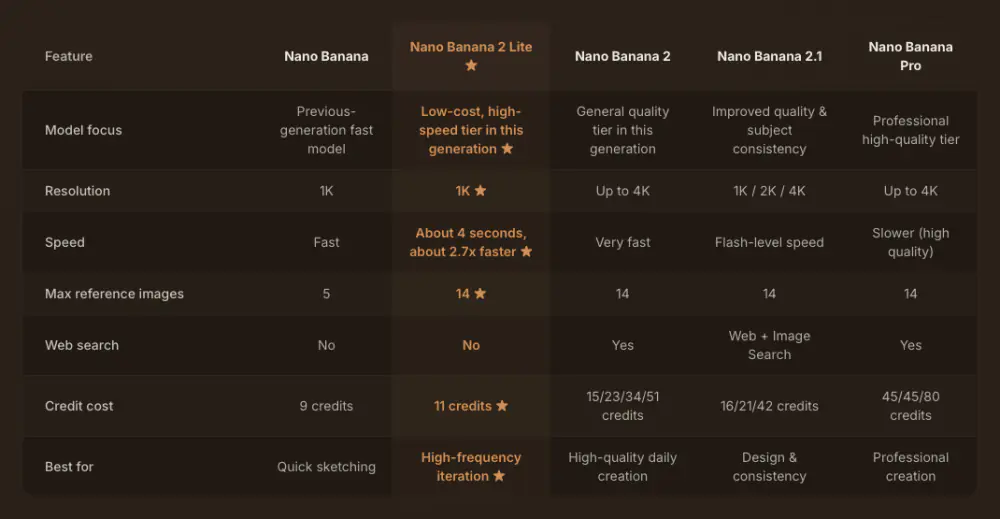
Raphael's own comparison of its Nano Banana models. Higher resolutions cost more credits per image.
Using the 1K prices Raphael lists, the Pro plan's monthly allowance works out like this:
| Model at 1K |
Credits per image |
Images from 2,000 credits |
| Nano Banana 2 Lite |
11 |
181 |
| Nano Banana 2 |
23 |
86 |
| Nano Banana Pro |
45 |
44 |
Edits, upscales and retries come out of the same balance, so budget for the whole job rather than single images.
Read this before you subscribe
- No direct plan changes. To move between plans, you cancel renewal, wait for the current period to end, then choose another plan.
- Refunds are the exception. Raphael's pricing FAQ says digital purchases are generally non-refundable; requests go to support by email.
- Prices may rise. Asked whether prices will go up, the FAQ answers "Probably," while promising to honor annual plans already bought.
- No API. The FAQ says there is no public API at the moment.
On Raphael, the watermark comes off only when you subscribe. On Makify AI, every image downloads clean, even the ones made with free starter credits.
Generate without a watermark →
What You Can Do on Raphael AI
Text to image. One prompt box takes up to 3,000 characters, with an AI Enhance switch that expands a short idea into a fuller prompt. The homepage generator accepts up to 6 reference images and returns 1 to 4 images per run; the Nano Banana 2 family takes up to 14 references. You choose the model, aspect ratio, resolution, quality and a style preset, and Fast Mode skips the queue for credits.
Photo editor. Four modes: Edit, Local edit, Erase objects and Edit text. You upload a JPG or PNG up to 20 MB and describe the change. You can prepare an edit as a guest, but submitting it needs an account, and the default edit on Seedream 3.5 Pro costs 2 credits. Editing is not part of the free unlimited mode.
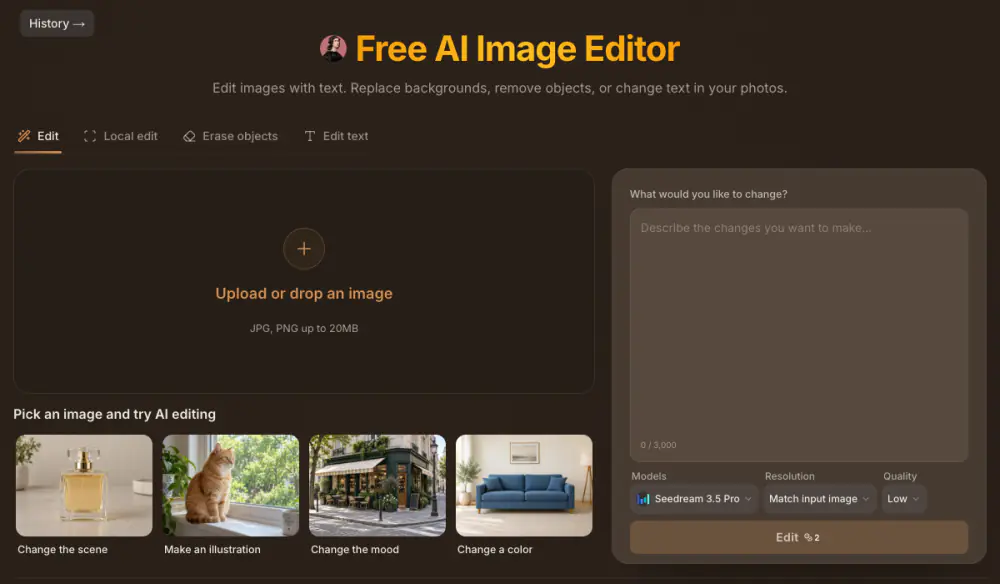
Raphael's photo editor. The default model is Seedream 3.5 Pro, and each edit shows its credit cost on the button.
AI tools. Image templates, an expander, a background remover, an upscaler (2× up to 2048×2048 or 4× up to 4096×4096, from images up to 10 MB), an AI watermark remover, a clothes changer, a hairstyle changer and a headshot generator.
Video. The free video mode runs MiniMax H3 Turbo at 480p, 4 seconds and 16:9, with sound and no sign-up. Credits unlock Seedance 2.5, Veo 3.1, Kling 3.0 and Wan 3.0, which Raphael lists at up to 30 seconds, plus a video editor and a video upscaler.
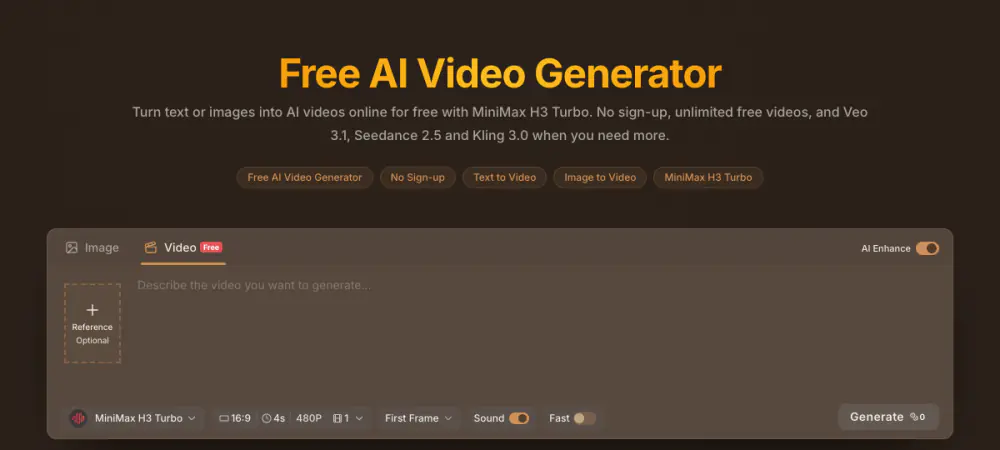
The free video tab defaults to MiniMax H3 Turbo, 16:9, 4 seconds, 480p, at 0 credits.
What's missing. There is no public API, and we found no dedicated tools for product photography, old photo restoration, changing a photo's camera angle or converting images to SVG.
Image Quality: It Depends on Which Raphael You Use
Raphael doesn't make its own frontier models, so "Raphael quality" really means the quality of the model you picked, at the resolution you paid for. Two people can have opposite experiences. One is judging free Seedream 3.5 at 0.5K; the other is judging Nano Banana Pro at 4K.
The free mode runs Seedream 3.5, an older Seedream version than the Seedream 5.0 models Raphael sells for credits, at its lowest resolution and quality setting. That is a reasonable engine for thumbnails, mood boards and prompt practice. It is not the engine behind the sample images on Raphael's model pages.
User reports point the same way. Raphael's Trustpilot profile has six reviews and a 2.8 score. The complaints mention poor image quality even at a higher setting, having to buy credits, unreliable generations, female characters that look alike, and a canvas edit that regenerated the whole picture instead of changing one part. The one glowing review comes from a parent making free phonics illustrations for their children, who still notes that consistent characters take many attempts and that resolution is sometimes poor. Six reviews on an unclaimed profile is a small sample, but the pattern matches the settings: free output is draft output.
The fair way to judge Raphael is to take one real job, run it on the model you'd actually pay for, at the resolution you'd publish, more than once, and inspect the result at full size. For a second opinion, run the same prompt on the same model somewhere else, for example on the Nano Banana 2 generator here, and compare the two side by side.
Raphael AI Pros and Cons
What Raphael does well:
- A genuinely free, unlimited basic mode with no account and no credit card.
- A wide model menu in one place: 14 image models and 13 video models, including Nano Banana 2.1, GPT Image 2.5, Seedream 5.0 and Veo 3.1.
- Free video with no sign-up, which few competitors offer.
- Transparent credit costs. Each model page lists its price, and the Generate button shows the cost before you spend anything.
- Large monthly credit allowances on the yearly plans.
Where it falls short:
- The headline and the default don't match. "Powered by GPT Image 2.5" sits above a free default of Seedream 3.5. GPT Image 2.5 is available, but it costs credits.
- Free means watermarked and small. Every free image carries a watermark, and the default resolution is 0.5K.
- "Unlimited" is narrow on paid plans too. Unlimited use covers Seedream 3.5 on Pro, adds Seedream 3.5 Pro on Ultimate and adds MiniMax H3 on Max. Every other model draws down credits.
- Mixed messages on commercial use. The homepage FAQ contradicts itself; the terms limit commercial use to paid subscribers.
- Free images aren't private by default. The pricing FAQ lists images that "won't be shared in our public gallery or suggested images" as a subscriber benefit, along with an ad-free experience. On a free account, assume your creations can be seen.
- Rigid billing. No direct plan switching, generally no refunds, and a "Probably" on future price rises.
- No API. Developers can't automate it.
Is Raphael AI Safe and Private?
Raphael is a legitimate, operating product. It publishes terms of service and a privacy policy (both updated April 21, 2026), lists a support email and handles subscriptions through a management portal. The questions worth asking are about privacy and lookalike domains, not about whether it exists.
How it handles your data, according to its own pages:
- Guests: requests are processed temporarily and aren't saved to history unless you sign in within 10 minutes.
- Accounts: prompts, uploads and generation history are stored so you can return to them. Files expire under Raphael's retention policy, so download anything you want to keep.
- Selling data: Raphael says it never sells your prompts or images.
- Visibility: full privacy is a paid-plan benefit, as noted above.
A practical safety checklist: make sure the address bar says raphael.app and not one of the lookalikes, keep confidential client work and other people's photos off a free account, and read the terms before using any image commercially.
As for "is it a scam?": a 2.8 score from six reviews on an unclaimed Trustpilot profile is too small a sample to call it either a scam or a success. What the evidence supports is narrower: the product works as described on its pricing page, and less so as described by its homepage badges.
Best Raphael AI Alternative: Makify AI
If Raphael's free mode covers what you need, there's no reason to switch. Makify AI is the better fit when you need a finished image rather than a draft, a model Raphael doesn't carry, or a tool built for one specific job. It doesn't have an unlimited free mode: you create a free account, get starter credits and see each model's credit cost before you generate.
|
Raphael AI |
Makify AI |
| Watermark |
On every free image; removed on paid plans |
None on any image, including images made with free starter credits |
| Free access |
Unlimited basic mode, no account needed |
Free account with starter credits |
| Image models |
Nano Banana 2.1, 2 and Pro, GPT Image 2.5 and 2, Seedream 5.0, Grok Imagine 2.0 and more |
The same families, plus Ideogram 4.0 and Qwen Image 3 |
| Video models |
Seedance 2.5, Veo 3.1, Kling 3.0, Wan 3.0, MiniMax H3 |
Seedance 2.5, Kling 3.0 with Motion Control, Wan 3, MiniMax H3 and H3 Max, FLUX 3 Video |
| Task tools |
Editor, background remover, expander, upscaler, watermark remover, clothes and hairstyle changer, headshots |
Editing tools, background remover, expander, upscaler, outfit and hairstyle changer, headshots, plus product photography, old photo restoration, angle changer, image combiner and image to SVG |
| Highest resolution |
0.5K free; up to 4K with paid credits |
Up to 4K on Nano Banana 2, Nano Banana Pro and GPT Image 2 |
| Commercial use |
Paid subscribers |
Included on every subscription plan |
| API |
No public API |
API keys in your account |
Where to start, depending on the job:
Who Should Use Raphael AI (and Who Shouldn't)
Choose Raphael AI if:
- You want free drafts with no account and don't mind a watermark.
- You're learning to write prompts and want unlimited attempts.
- You're making personal, classroom or family projects where 0.5K is enough.
- You want a large monthly credit allowance on premium models and are happy to commit to a yearly plan.
Look elsewhere if:
- You need clean images without subscribing to anything.
- You need typography-heavy designs, product shots or restored photos from a dedicated tool.
- You need an API.
- You plan to upload confidential work on a free account.
Raphael AI Review FAQ
Is Raphael AI completely free?
Raphael has a free basic mode with no sign-up and no generation limit: Seedream 3.5 at 0.5K and Low quality, with a watermark on every image. Premium models such as Nano Banana 2 and GPT Image 2.5, photo edits and clean exports need credits or a paid plan, which starts at $10 a month billed yearly.
Is Raphael AI safe to use?
Yes. It's a legitimate, operating service with published terms, a privacy policy and a support email, and it says it doesn't sell your prompts or images. Use the official raphael.app address, since lookalike sites use the same name.
Is Raphael AI private?
Partly. Guest requests aren't saved unless you sign in within 10 minutes, and signed-in accounts store prompts, uploads and history. Full privacy, meaning images aren't shared in the public gallery or suggested images, is listed as a paid-plan benefit.
Is Raphael AI uncensored?
No. "Unlimited" refers to how many images you can make, not what you can make. Raphael's terms prohibit NSFW, sexually explicit, nude, sexually suggestive and 18+ content on every plan, free or paid.
Does Raphael AI add a watermark?
Yes, to every free image. The Pro, Ultimate and Max plans remove it. Makify AI doesn't add a watermark to any image, including images made with free starter credits.
Is there a Raphael AI app?
Not an official one. Raphael's FAQ says it runs on the web for now, with mobile apps planned, and it works in mobile browsers. Apps called "Raphael" in app stores are third-party products.
Can I use Raphael AI images commercially?
Only with a paid subscription, according to Raphael's terms; free users are limited to personal and non-commercial use. One answer in the homepage FAQ suggests otherwise, but the terms are what count if there's ever a dispute.
What is the best Raphael AI alternative?
For clean, finished images, Makify AI: no watermark on any image, models Raphael doesn't offer such as Ideogram 4.0 and Qwen Image 3, and dedicated tools for product photos and old photo restoration. Start with the Raphael AI alternative generator.
The Bottom Line
Use Raphael's free mode for what it is: an unlimited, watermarked sketchpad. Before you pay, pick the model you'd actually use, check its credit cost on the model page, and run your real job at full resolution. If you need a clean, finished image today, start here:
Sources
- Raphael AI pricing — monthly and yearly plan prices, credits, unlimited model benefits, credit packs, the watermark line, and the FAQ on plan changes, refunds, price rises, privacy and the API.
- Raphael AI terms of service — independent-service status, commercial-use rights for paid and free users, and prohibited content.
- Raphael reviews on Trustpilot — the 2.8 score, the six reviews and the unclaimed profile.
- Raphael launch post on Indie Hackers — the April 14, 2025 launch: Flux.1-dev, no limits, no watermarks and 10-minute auto-delete.